QR Code Decorations for Birthday Parties: Printable Signs and Table Cards

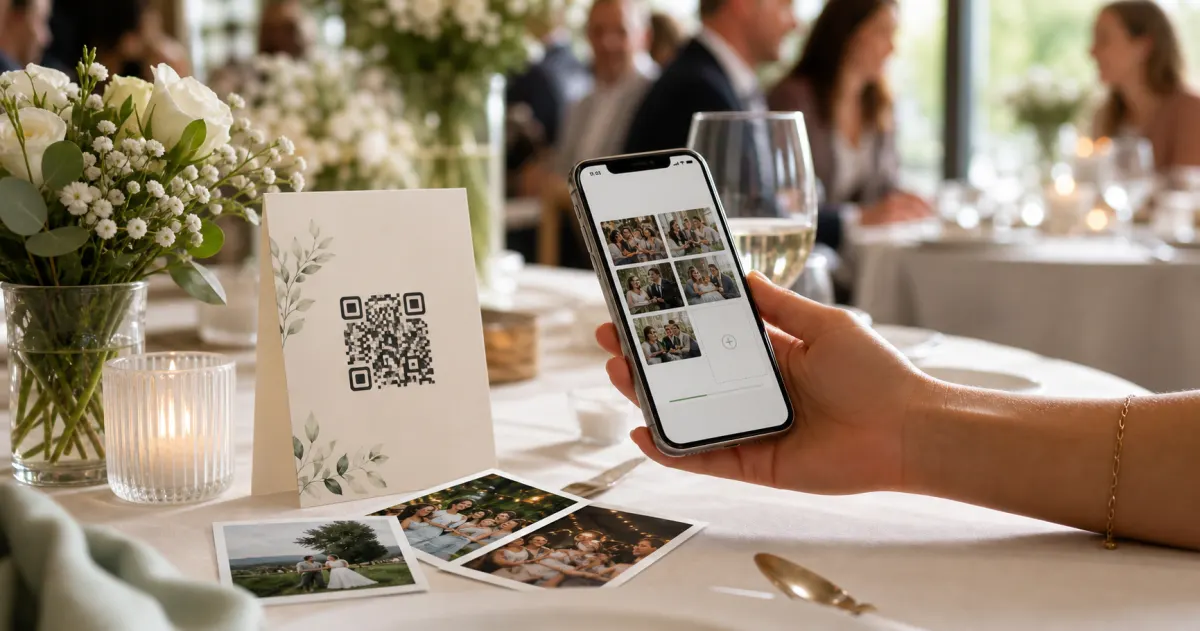
A QR code does not have to look like a parking-meter sticker stuck to your party.
That is the thing nobody tells you. You set up the album, you generate the code, and then you print it on a scrap of paper and prop it against the cake — and it sits there looking like a receipt. Meanwhile you have spent weeks choosing balloons, a colour scheme, a banner with the right shade of pink. The one item that asks every guest to do something is the one that looks like an afterthought.
It does not have to be that way. A QR code can be a proper decoration: a framed table sign, a little folded card at each seat, a tag on the favour bags, all matched to your party's colours and wording. It can look like it belongs. And when it looks like it belongs, people actually read it — and scan it.
This guide is about the printables themselves. Not where to stand them (that is a separate guide on placement), but what to put on the page: the wording, the layout, the sizes that scan, the file formats that print sharp, and how to either grab a ready-made template or design your own in twenty minutes. By the end you will have a sign and a stack of table cards you are happy to leave on display all night.
A quick note on the destination first. With Gathmo, the code on your sign opens a branded birthday album right in the guest's browser — no app to download, no account to create. They scan, they upload photos, videos, or a voice birthday wish, and they are done. That matters for a decoration, because the prettiest sign in the world fails if scanning it leads somewhere fiddly. A frictionless destination is what lets a good-looking sign actually do its job.
What counts as a "QR code decoration" at a birthday party?
A few different printables do the work, and most parties use two or three together:
- A hero sign. One larger framed or standing sign — usually on the cake table, the gift table, or by the door — that introduces the album. This is the showpiece. "Add your photos to [Name]'s 40th."
- Table cards (table tents). Small folded cards, one per table, so seated guests can scan without getting up. The workhorse of the set.
- Seat cards. Even smaller — one at each place setting — usually pulling double duty as a prompt to leave a voice or video wish.
- Favour-bag tags. For kids' parties especially: a little tag tied to each going-home bag so other parents can upload from the car or the sofa later.
- A banner add-on. A coordinating flag or panel that hangs off the "Happy Birthday" garland, so the code reads as part of the décor.
The point of treating these as decorations, rather than instructions, is simple: a guest reads a decoration. A guest ignores an instruction. The whole craft here is making "scan this" feel like part of the party.
The three numbers every printable has to respect
Before any of the pretty stuff, three specs decide whether your decoration scans on the first try or frustrates Aunt Margaret into giving up. They are not negotiable, and they hold no matter how lovely the design is.
- The 10:1 size rule. A QR code's minimum size is the maximum scanning distance divided by ten. A code on a banner people read from 2.5 metres away needs to be roughly 25 cm. A code on a table card someone leans over from 40 cm needs only a few centimetres. Size every printable for the furthest person who will use it.
- The quiet zone. Leave a blank margin — at least four modules wide — on all four sides of the code. This is the single most common way a beautiful design breaks scanning: someone crowds the code with text, a flourish, or a busy background pattern, and scanners stall. Give it room to breathe.
- Dark on light, and never the reverse. Use a dark code on a light background. Inverting it — light code on a dark panel to match a moody colour scheme — fails on a lot of scanners. If your party is all black and gold, put the code inside a light panel rather than tinting the code itself.
One more, less obvious: use a dynamic QR code rather than a static one. A static code bakes the destination in permanently; a dynamic code is the kind you use for event materials you print ahead of time, because the link can be managed and it tolerates small print smudges better. Gathmo's event links are built to be printed and scanned in exactly these real-world conditions.
Sizing your printables (a cheat-sheet to design against)
Here is the part to keep open while you lay things out. All sizes are minimums — bigger is always safer.
| Printable | Guest scans from | Code size (minimum) |
|---|---|---|
| Favour-bag tag, seat card | ~20 cm (in hand) | 2.5 × 2.5 cm |
| Table tent / table card | ~30–50 cm (seated) | 3–5 cm |
| A5 standing sign | ~40–70 cm | 4–7 cm |
| Poster / large hero sign | ~1–2.5 m | 10–25 cm |
| Banner panel across a room | ~2.5–3 m+ | 25–30 cm+ |
Below about 2 × 2 cm, scanning gets unreliable at arm's length — so that is the floor for the tiniest tag. And whatever the size, keep that four-sided quiet-zone margin intact.
What to write on the sign (wording that gets scans)
A printable QR decoration is really two things: a code and a sentence. The sentence does more work than people expect. Here is how to get it right for each birthday audience.
For a kids' party, lead with ease and a thank-you, and aim it at the parents:
"Thanks for celebrating [Name]'s 7th! Snap a photo, scan here, and pop it in our album — no app, no sign-up."
For an adult milestone (a 40th, 50th, 70th), you can lean sentimental, and you can invite wishes, not just photos:
"Help us tell the story of [Name]'s 60th. Scan to add your photos — and leave a 60-second voice message they can keep forever."
For a surprise party, the public sign goes up only after the reveal — and reads conspiratorially:
"Surprise pulled off! Now spill the photos. Scan to add yours to [Name]'s album."
Three rules cut across all of them:
- Name the person and the occasion. "[Name]'s 30th" beats "Event Album" every time — it is warmer and it tells guests they are in the right place.
- Say "no app, no sign-up." It is the single most reassuring line you can print, because it removes the unspoken fear of "is this going to make me download something." With Gathmo it is also simply true.
- One instruction, not five. "Scan to add your photos" is plenty. A wall of steps makes people put their phone away.
Match it to the party (the "decoration" part)
This is where a QR printable stops being a utility and becomes part of the look.
- Pull two or three colours from your scheme. If the party is Confetti pink and pop yellow, the sign's border, the text, and the frame should echo that. Keep the code itself dark-on-light, but the card around it is all yours.
- Use a display font for the headline. A warm, weighted headline font on "Happy 50th, Mum!" reads as celebration; the same words in a plain system font read as admin. Save the plain, legible font for the small print under the code.
- Frame the hero sign. A cheap standing photo frame turns a printed A5 into something that looks intentional on the cake table. It also keeps the quiet-zone margin clean, because the frame stops anyone propping clutter against the code.
- Coordinate the set. The table cards, the seat cards, and the favour tags should obviously belong to the same family as the hero sign — same colours, same font, same little motif. A matched set looks designed; mismatched scraps look improvised.
- If you overlay a photo or logo on the code, switch the code to the highest error-correction level (Level H, about 30% recovery) so the overlay does not stop it scanning. For a plain code with nothing on top, the standard default (Level M, ~15%) is fine for clean table cards and signs.
Two routes: grab a template, or make your own
You do not have to be a designer. There are two honest paths, and both are fine.
Route 1: a ready-made printable template
Search for birthday QR sign templates and you will find a healthy supply on the big template and craft marketplaces — editable designs where you drop in your wording and your code, then print at home or at a shop. This is the fastest route, and the SERP for these terms is dominated by template and print-on-demand listings precisely because so many hosts want exactly this.
The catch: a template gives you the frame, not the album. You still need a real photo-collection destination behind the code — otherwise the prettiest template just leads to a dead link. So the workflow is: set up your Gathmo birthday album first, get your code, then drop it into whichever template you like.
Route 2: design your own in a free tool
If you want it to match your party exactly, a free design tool (the kind you would use for an invite) does the job in about twenty minutes:
- Set up your birthday album and download your QR code as a high-resolution PNG. Export it at at least 300 DPI — this is the resolution that keeps a code crisp for close-range print like cards and tags. A blurry low-res code is the most common print failure there is.
- Pick your canvas size — A5 for a hero sign, a small folded card for table tents, a tag shape for favours.
- Place the code with its margin. Drop it in, then add empty space around all four sides. Resist the urge to fill that space.
- Add your headline and one-line instruction. Name, occasion, "scan to add your photos," "no app, no sign-up."
- Add your colours and a motif, keeping the code dark-on-light.
- Export as a print-ready PDF and you are done.
Either route lands in the same place: a printable that looks like it belongs at the party and scans on the first try.
The step that everyone skips (and regrets)
Test-print one and scan it before you run off the batch.
Print a single proof at the actual size you will use, in the actual lighting of the venue, and scan it from where it will live — the seated distance for a table card, the across-the-room distance for a banner. A code that scans perfectly on your laptop screen can fail on glossy card stock under dim party lighting, where glare washes out the contrast. Catching that on one test print costs you nothing. Catching it after you have printed thirty table cards and stuffed forty favour bags costs you the evening's photos.
This is the highest-leverage minute in the whole process. Do not skip it.
Why the destination decides whether your decoration works
You can do everything above perfectly, and it still falls flat if the scan leads somewhere annoying. So this is the part to get right.
Most people have a phone and most people have scanned a QR code — smartphone penetration in Germany sits around 97%, and surveys put QR scanning firmly in the mainstream, with the majority of consumers having used one in the past year. So the friction is almost never the code. It is what happens after the scan. If the destination demands an app install or an account, a meaningful share of your guests quietly back out.
With Gathmo, the scan opens a branded birthday album in the browser. No app, no guest signup — guests upload photos, videos, or record a voice or video birthday wish, and that is it. A couple of things make the destination worth the decoration around it:
- Voice and video wishes on every plan. Voicemail wishes are included on all tiers (30 seconds on Free; unlimited on paid tiers), which is what turns a seat card into a keepsake — the birthday person replays everyone's voice later like a card that never stops playing. (Automatic transcripts of those wishes are a Grand-tier and business feature.)
- A real album, not a dead drop. Everything lands in one branded gallery you can download as a single ZIP on paid plans, so the photos do not scatter back across fifteen camera rolls.
- EU data, handled carefully. Media is stored in the EU (Frankfurt), and paid tiers run AI moderation before content appears — useful peace of mind when half the photos are of other people's kids.
Birthday plans, briefly:
- Free — a quick family gathering: up to 100 uploads, 30-second voice wishes, €0.
- Essential (€19) — an average party: unlimited guests, 5-minute wishes, AI moderation.
- Celebrate (€39) — a milestone with family and friends: unlimited guests, unlimited wishes, a live slideshow.
- Grand (€79) — the big one: unlimited guests, 180-second wishes with transcripts, and a live stream.
A quick word on privacy (especially for kids' parties)
If your decorations are collecting photos of children, here is the sensible version — not legal advice. Under the GDPR, ordinary party photos are not automatically "special category" data; that only changes if something like face-recognition technology is used to identify individuals, and Gathmo does not do face recognition (it is not a launch feature). You can keep your album visible only to the people you share the link with, rather than publishing it publicly. And any guest can ask for a photo of them or their child to be removed — the law gives a controller up to one month to act on such a request. Storing media in the EU (Frankfurt) and moderating it on paid tiers is part of how Gathmo keeps that simple. For the full version, our kids' birthday GDPR guide walks through it properly.
Download the QR code in print-ready format
From the Gathmo dashboard, download the QR code as SVG for large prints or PNG at 300 DPI for card-size prints. Never screenshot a QR code from a browser -- this often drops resolution below the reliable scanning threshold.
Place the code in a birthday-themed design
Open Canva or Adobe Express and start from a birthday template. Drop the QR code at a minimum of 3 cm x 3 cm for table card size. Keep the quiet-zone border around the code intact -- do not crop it or overlap it with decorative elements.
Add a clear one-line instruction
Print 'Scan to add your photos and birthday wishes' next to the code. One short instruction removes hesitation. Use a high-contrast font that reads clearly at table distance under party lighting.
Test-scan the design on the actual card stock
Scan the completed design on screen with an iPhone and Android phone first, then test-print one card and scan that too. Uncoated or textured birthday card stock can affect scanning reliability -- better to find this before printing the full batch.
Frequently asked
Set up a birthday album, and the platform generates the code for you — with Gathmo, you create the event, and your shareable link and QR code come with it. Download the code as a high-resolution image, then drop it onto a sign or template. You do not need a separate QR generator.
Aim for at least 3–5 cm for a card scanned at a seated distance of about 30–50 cm. For a tiny favour-bag tag scanned in the hand, 2.5 × 2.5 cm is the practical minimum — below roughly 2 × 2 cm it gets unreliable.
Yes. Export the code at 300 DPI or higher so it stays sharp, keep it dark-on-light, leave the four-sided margin, and — the bit people skip — print one proof and scan it before you print the whole batch.
No. Modern phone cameras read QR codes natively. And with Gathmo the destination needs no app or account either — guests scan and upload straight from the browser.
The big template and craft-print marketplaces have plenty of editable birthday QR sign and table-card designs — you add your wording and your own code. Just remember the template is only the frame; you still set up the actual album the code points to.
Yes. Three steps: generate the QR code from your photo sharing platform (Gathmo's host dashboard generates one in one click), drop the QR image into a free design tool such as Canva on a birthday-themed template, and add a one-line instruction (Scan to add your photos and birthday wishes). Download and print on cardstock. The design takes 10 minutes; the output is indistinguishable from a professional card at table distances. Print at 300 DPI minimum and test-scan from 30 to 50 cm before printing the full batch.
The instruction text matters almost as much as the placement. Most effective formulas: Scan to add your photos + leave a birthday message (specific double benefit), Share your photos -- it takes 10 seconds (removes effort-uncertainty), or Tap to send [name] a birthday message (personal and clear). Avoid vague text like Scan here or Photo gallery. The prompt tells guests exactly what they get and what it costs (10 seconds). This specificity reliably outperforms a bare QR code with no instruction because it removes uncertainty about what happens after the scan.
 Guide
GuideHow to collect photos from your event guests (the easy way)
A printed QR code on the table collects more photos than any link in a group chat -- here is why, and how to set one up in two minutes.
 Story
StoryThe most underrated wedding keepsake: guest voice messages
Guest voice messages are the wedding keepsake couples replay most -- real voices, real pauses, the things people said when they actually meant them.
 Guide
GuideCollecting guest photos in the EU without the GDPR headache
Consent, data residency, and erasure -- the three things that make event-media GDPR-compliant, and how to get them right by default.